BAS Controller Replacement Checklist: What to Back Up, Record, and Test Before Swapping a Controller

Replacing a BAS controller is a controlled migration of logic, network identity, I/O configuration, field wiring, schedules, alarms, trends, graphics references, and safety behavior. A replacement can be online and still leave the equipment operating incorrectly.
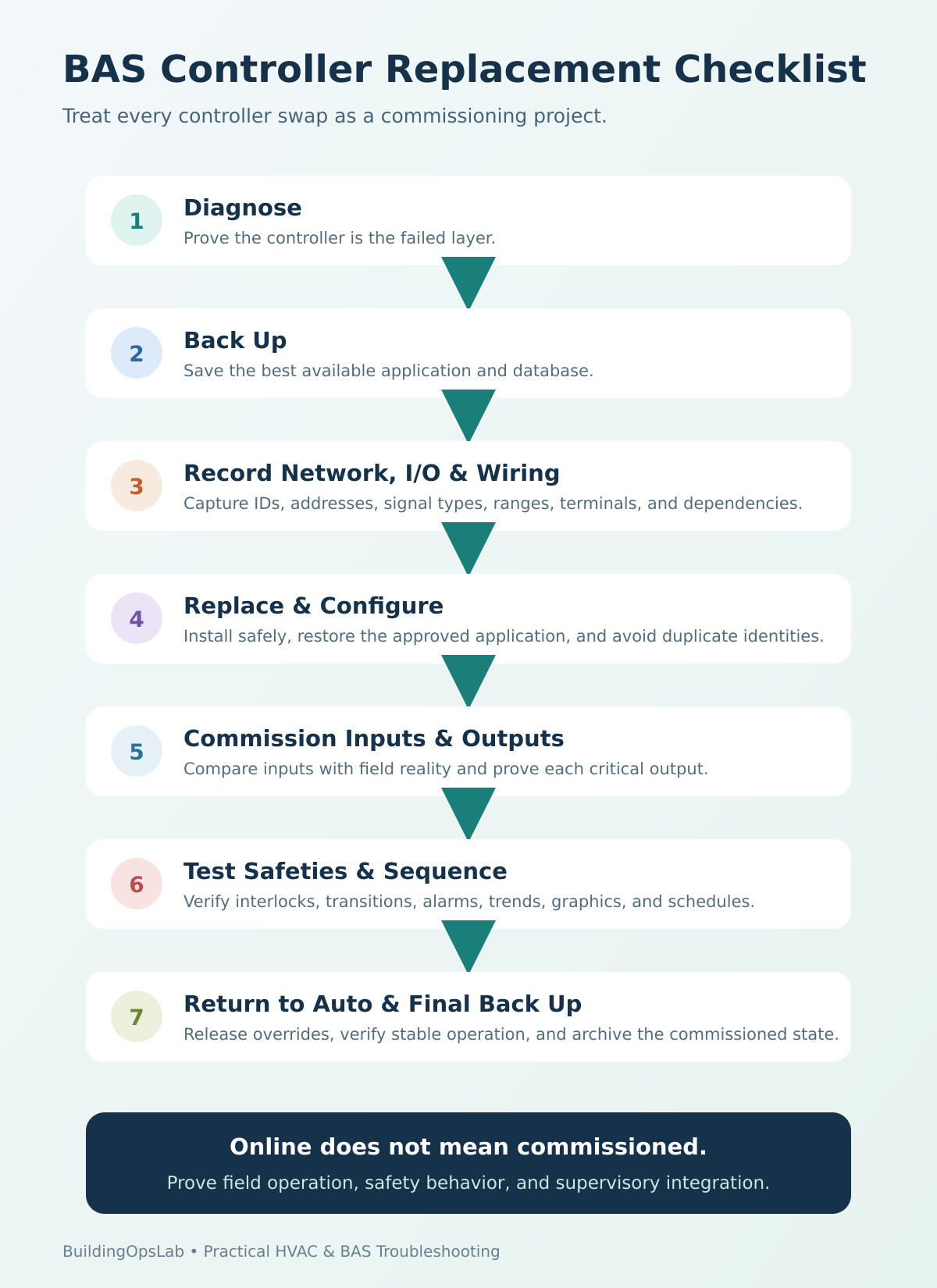
Treat every controller swap like a small commissioning project: prove the controller is the failed layer, capture what must be restored, then commission inputs, outputs, interlocks, sequence, and supervisory integration before returning to automatic operation.
Quick Answer
Before swapping a BAS controller, create the best available backup, record the exact controller type and firmware, capture network identity and addressing, document every I/O point and signal type, photograph/label field wiring, and identify the schedules, alarms, trends, graphics, and integrations that depend on the device. After the swap, do not stop at “controller is online.” Verify every critical input, every commanded output, safety interlocks, the full operating sequence, alarms, trends, graphics, and final backup.
In This Guide
- The First Question: Is the Controller Really Bad?
- Before the Swap: Capture the Controller as a System
- The Physical Replacement
- Load and Configure the Replacement Controller
- Commissioning: Online Is Only the Beginning
- Manufacturer Examples: Why Replacement Procedures Differ
- BAS Controller Replacement Checklist
- Key Takeaways
- FAQ
- Field Evidence Worksheet
- Choose Your Next Diagnostic Step
The First Question: Is the Controller Really Bad?
Before replacement, separate controller failure from field-device failure, wiring, power, communication, relay, actuator, motor, sensor, or software configuration. A wrong diagnosis adds downtime and commissioning risk without fixing the original problem.
In a verified FCU-61 field investigation, the fan-coil motor itself was checked with the HVAC technician and confirmed to be working. Controller output checks then pointed to the BAS controller as the problem, so controller replacement was recommended for quotation. The important part of the case is the order of diagnosis: prove the field device and controller output before condemning the controller.
Case boundary: This example ends at the recommendation to quote a replacement. It does not document a completed controller swap or a verified post-replacement recovery. Use the commissioning checks below to establish those outcomes on your own project.
Before the Swap: Capture the Controller as a System
1. Identify the Exact Hardware and Application
- Controller manufacturer, family, and exact model.
- I/O expansion modules and locally connected devices.
- Firmware or software revision where available.
- Power requirements and transformer/source.
- Communication type: BACnet/IP, BACnet MS/TP, Modbus, proprietary bus, or other.
- Program/application name and the engineering tool needed to load it.
Do not assume that a newer controller in the same family accepts the old database unchanged. Migration requirements can differ by hardware generation, firmware, licensing, certificates, drivers, and I/O architecture.
2. Back Up the Application and Database
Create the best available controller or project backup before disturbing the device. If the controller is already failed, locate the latest engineering database, commissioning archive, supervisor copy, or prior backup, and record its date/source.
Backup behavior is vendor-specific. Siemens, for example, documents that current PXC4/5/7 database backups are intended for controllers of the same type and firmware revision, and that device-serial-bound artifacts such as some certificates and licenses are not part of the database backup. That is a useful reminder not to treat a backup file as a universal clone of the old hardware.
3. Record Network Identity Before Disconnecting Anything
| Network item | Examples to record | Why it matters |
|---|---|---|
| BACnet identity | Device Instance, Device Name, Network Number where relevant | Supervisor references, discovery, routing, and duplicate-ID avoidance |
| MS/TP | MAC address, baud rate, EOL position, trunk location | Local trunk communication and token passing |
| BACnet/IP / Ethernet | IP address, subnet, gateway, VLAN/NIC where applicable | IP reachability and BACnet binding/routing |
| Other protocols | Modbus address, port settings, proprietary bus address | Restoring third-party integrations |
| Time/configuration | Time-sync role, time zone, scheduled functions if local | Prevents clock/schedule behavior from changing after replacement |
If the old controller is still powered or intermittently online, never connect the replacement with the same BACnet Device Instance or local MS/TP MAC at the same time. Duplicate identities can create a new communication problem that hides the original issue.
4. Document I/O and Physical Wiring
Photograph and label the wiring, but also record terminal functions, commons, power source, relay/triac configuration, analog signal type, sensor type/range, and hardware jumpers. Capture the configured mode of universal inputs and outputs.
Field lesson: A separate commercial-building cooling-valve case showed why signal-type documentation matters. The installed actuator used 0–10 VDC while the BAS program was configured for 2–10 VDC. Correcting the BAS output range to 0–10 VDC restored the intended actuator response. A controller swap is exactly the kind of work where a hidden signal-range mismatch can be recreated if I/O details are not documented.
5. Map the Application Dependencies
- Schedules hosted locally or referenced from a supervisor.
- Alarms and notification routing.
- Trend extensions/history collection.
- Graphics and supervisory point bindings.
- Networked points consumed by other controllers.
- Interlocks, permissives, and safeties.
- Lead/lag or plant coordination logic.
- Overrides or temporary operator commands that must not be copied blindly.
The Physical Replacement
Follow site electrical-safety procedures and manufacturer instructions. Label conductors before removal and verify terminal function rather than assuming terminal numbers match; alternate controllers may use different layouts.
Before applying power, verify voltage/polarity where applicable, commons, network polarity, shield/EOL arrangement, and output-source jumpers. Wrong output-power configuration can damage hardware or energize equipment unexpectedly.
Load and Configure the Replacement Controller
1. Establish Communication Without Creating Duplicates
Set the correct addressing and network parameters according to the platform workflow. If the old controller remains on the trunk for data recovery, use a temporary unique identity for the new device until cutover is ready. Confirm that the supervisor discovers the intended device and that no routing or duplicate-address alarms appear.
2. Load the Approved Application
Download or restore from the approved source, not from an unknown laptop copy. If a migration is required, compare the old application to the new one and document any points, modules, or functions that cannot be transferred directly.
3. Verify Controller-Specific Items
Check firmware compatibility, I/O jumpers, licensing, certificates, network bindings, and other items the vendor stores outside the application database. Manufacturer restoration procedures take priority over generic advice.
Commissioning: Online Is Only the Beginning
Step 1 — Verify Power and Device Health
Confirm stable power, normal device health, and reliable communication before output testing. Resolve reboots, dropouts, or hardware faults first.
Step 2 — Commission Every Critical Input
Compare BAS values with credible field conditions. Check sensor type, range, units, polarity, scaling, and status; use an independent measurement for critical inputs where practical.
Step 3 — Command and Verify Outputs One at a Time
Test each critical output and observe the physical result. Verify relay/contactor response for binary outputs and signal/full-stroke or speed response for analog outputs. Confirm that 0% represents the intended minimum or closed state.
Step 4 — Test Safeties and Interlocks
For controllers involved in equipment protection, verify freezestat, smoke, flow proof, fan proof, limits, compressor permissives, pump interlocks, and hardwired safety chains according to the sequence and manufacturer requirements. Never defeat a safety to make a BAS output appear correct.
Step 5 — Run the Sequence Through Its Operating Modes
Test the relevant operating modes—occupied/unoccupied, heating/cooling, enable/disable, lead/lag, staging, reset, or economizer—and confirm transitions, not just steady state.
Step 6 — Verify Supervisory Integration
- Graphics display the correct command and status points.
- Alarms generate and clear correctly.
- Trends are collecting the intended points and units.
- Schedules reach the correct target objects.
- Remote commands follow the expected priority and release correctly.
- Networked values consumed by other controllers are updating.
Step 7 — Remove Overrides and Return to Automatic Operation
Document every override used during commissioning and release it deliberately. Watch the system in automatic control long enough to confirm stable operation. A controller that works only while points are manually forced is not commissioned.
Step 8 — Save the Final Commissioned Backup
After the system is proven, create a new backup/archive of the commissioned field condition. Label it with date, equipment, controller identity, software/firmware where relevant, and technician notes; this becomes the next restore point.
Manufacturer Examples: Why Replacement Procedures Differ
Johnson Controls’ current SNC guidance calls for uploading the current database before replacement and updating the site so it communicates with the new supervisory controller. Siemens separately documents PXC backup/restore limits tied to controller type and firmware. The principle is the same: follow the workflow for the actual platform being replaced.
BAS Controller Replacement Checklist
☐ Prove the controller is the failed layer before ordering replacement.
☐ Record exact model, firmware, expansion I/O, power, and engineering tool.
☐ Create or locate the latest reliable application/database backup.
☐ Record BACnet Device Instance, MAC, baud, IP settings, Network Number, and other protocol addresses as applicable.
☐ Document terminal wiring, commons, power source, I/O type, signal range, and jumpers.
☐ Record schedules, alarms, trends, graphics, interlocks, networked points, and overrides.
☐ Plan downtime, rollback, and temporary equipment operation if required.
☐ Install wiring according to function, not assumed terminal-number equivalence.
☐ Load the approved application and configure network identity without creating duplicates.
☐ Verify every critical input against field reality.
☐ Command and prove every critical output.
☐ Test safety interlocks and permissives.
☐ Functional-test the full sequence and state transitions.
☐ Verify graphics, alarms, trends, schedules, and supervisory references.
☐ Release overrides and observe stable automatic operation.
☐ Create a final commissioned backup and update documentation.
Key Takeaways
- Controller replacement starts with diagnosis, not a screwdriver.
- A backup is essential, but backups are not always portable across models or firmware.
- Network identity and I/O signal type are as important as the control program.
- A controller being online does not prove the equipment is commissioned.
- Inputs, outputs, safeties, sequences, graphics, alarms, trends, and schedules all need verification.
- Always save a final post-commissioning backup.
FAQ
Can I replace a BAS controller with the same model and just move the wires?
Not safely. Even a same-model replacement can require addressing, firmware, application loading, I/O configuration, time settings, and supervisory integration. The field wiring also needs to be verified, not assumed.
Should I reuse the old BACnet Device Instance?
Usually the replacement ultimately needs the intended site identity, but do not put two live devices with the same BACnet Device Instance on the internetwork. Follow the cutover procedure for the platform.
What if the old controller is completely dead and there is no backup?
Use the best available sources: engineering project, sequence of operation, drawings, point lists, supervisor database, graphics references, prior service records, and field verification. Do not rebuild the application from graphics alone if better source information exists.
What is the most commonly missed commissioning step?
Stopping after communication is restored. The critical work is proving that inputs are correct, outputs act on the intended field devices, safeties override normal commands, and the full sequence operates correctly in automatic mode.
Choose Your Next Diagnostic Step
Choose the guide that matches the evidence you found. Each path addresses a different part of the system.
- An input value is wrong after the swap: trace sensor type, wiring, and scaling.
- The replacement has an identity or discovery problem: compare Device Instance, MAC, and Network Number.
- A command is visible but the equipment does not respond: verify command, status, and physical proof.
- An analog actuator has the wrong travel or closed position: compare 0–10 V and 2–10 V configuration.
- Schedules or timestamps changed after replacement: check time synchronization and ownership.
- The Niagara supervisor or JACE is offline: use the separate JACE diagnostic path.
- You need a post-swap operating record: choose related points and timestamps to trend.
Browse the BAS and BACnet troubleshooting hub →
Sources & Further Reading
- Siemens — Desigo PXC4/5/7: Backing up a database
- Siemens — Desigo PXC4/5/7: Backup/Restore Database
- Siemens — Desigo PXC4/5/7 Commissioning: Device tab
- Johnson Controls — Facility Explorer SNC Commissioning Guide 16.0: Replacing an SNC
- Johnson Controls — FAC3611: Commissioning Field Controllers
- U.S. Department of Energy — HVAC Commissioning
Disclaimer: This article provides general commercial HVAC and building-automation information. Always follow manufacturer documentation, site-specific procedures, and applicable safety requirements.