BAS Time Sync Problems: Why Schedules, Alarms, and Trend Timestamps Go Wrong

A BAS can be controlling the right equipment with the right sequence and still create confusing operating reports if its clocks do not agree. A schedule may appear to start an hour early. An alarm can seem to occur before the event that caused it. A trend can show a discontinuity that looks like equipment failure. An audit trail may put commands in an order that never actually happened.
Time synchronization is therefore not just an IT detail. It is part of controls reliability. Modern BAS platforms may use NTP or SNTP, BACnet time-synchronization services, an operating-system time source, or a vendor-specific supervisory hierarchy. The exact architecture varies, but the troubleshooting objective is the same: identify the authoritative clock, verify how time is distributed, and confirm that every device is interpreting time zone and daylight-saving rules consistently.
Quick Answer
When schedules, alarms, trends, or audit timestamps do not line up, first determine whether the problem is a fixed offset or true clock drift. A fixed one-hour or several-hour offset often points toward time-zone, daylight-saving, or UTC/local-time interpretation. A clock that gradually moves away from the rest of the system points more toward synchronization failure or an incorrect time source. Do not manually correct each controller and call the job finished. Find the time master and the synchronization path.
In This Guide
- The Problem: BAS Time Is Part of the Control System
- Common Symptoms of BAS Time-Synchronization Problems
- Why It Happens
- How to Diagnose BAS Time Sync Problems
- Field Notes and Evidence Limits
- Time-Synchronization Investigation Record
- What Facility Managers Can Check Safely
- BAS Technician Checklist
- Key Takeaways
- FAQ
The Problem: BAS Time Is Part of the Control System
Johnson Controls documents this explicitly in current Metasys guidance: network-wide time management is used by scheduling, trending, audit trails, data collection, alarm time-stamping, and other functions that depend on accurate time. In Metasys, the Site Director normally acts as the site time authority for subordinate devices, while the Site Director itself can synchronize from an external source. Other BAS platforms implement the hierarchy differently, so the site architecture must be confirmed before making changes.
BACnet also defines TimeSynchronization and UTCTimeSynchronization services. That matters on multi-vendor networks because a controller may be capable of receiving time through BACnet even when a supervisor or server is using another method upstream. The presence of BACnet does not automatically tell you which device is the time master.
Common Symptoms of BAS Time-Synchronization Problems
- Equipment starts or stops at the wrong clock time even though the weekly schedule looks correct.
- Schedule behavior shifts by approximately one hour around daylight-saving transitions.
- Alarm timestamps from different controllers do not line up with one another.
- Trend data appears to jump backward, forward, or contain confusing gaps after a clock correction.
- Audit logs show a command after the response it supposedly caused.
- A supervisor shows the correct time while one engine or field controller is several minutes or hours different.
- A controller returns from a reboot or power outage with the wrong time and later corrects itself—or never corrects itself.
- Remote sites in different time zones display schedules or events inconsistently.
Why It Happens
1. The BAS Has More Than One Time Authority
A site can end up with a server synchronizing from one source while a controller, router, or other supervisor is also attempting to distribute time. Multiple time masters do not always fail dramatically; they can create intermittent corrections that are harder to recognize. Document which device is supposed to own time before changing settings.
2. Time Zone, DST, and UTC Are Being Confused
The displayed clock can be correct while a schedule still behaves incorrectly if different layers interpret local time, UTC offset, or daylight-saving status differently. On a multi-time-zone enterprise system, the distinction between server time and site-local time becomes especially important. A consistent fixed offset is a valuable diagnostic clue.
3. The Configured Time Source Is Unreachable
If the architecture depends on NTP or SNTP, the supervisory device must be able to reach the configured time source. DNS, routing, firewall policy, server changes, or an obsolete time-server address can break synchronization without taking the BAS offline. The BAS may continue controlling equipment while its clock slowly drifts.
4. A Device Was Replaced, Restored, or Reconfigured
Controller replacement, database restoration, supervisor migration, or a network change can reintroduce old time settings or a different synchronization method. Time configuration should be part of commissioning after any major controls change, not an afterthought.
How to Diagnose BAS Time Sync Problems
Step 1 — Measure the Offset Before Touching Anything
Write down the current time shown at the workstation, server or supervisor, network engine, affected controller, and any local equipment interface. Do this at the same moment. Record both the time and the time zone if the platform exposes it. The pattern often tells you more than the absolute value.
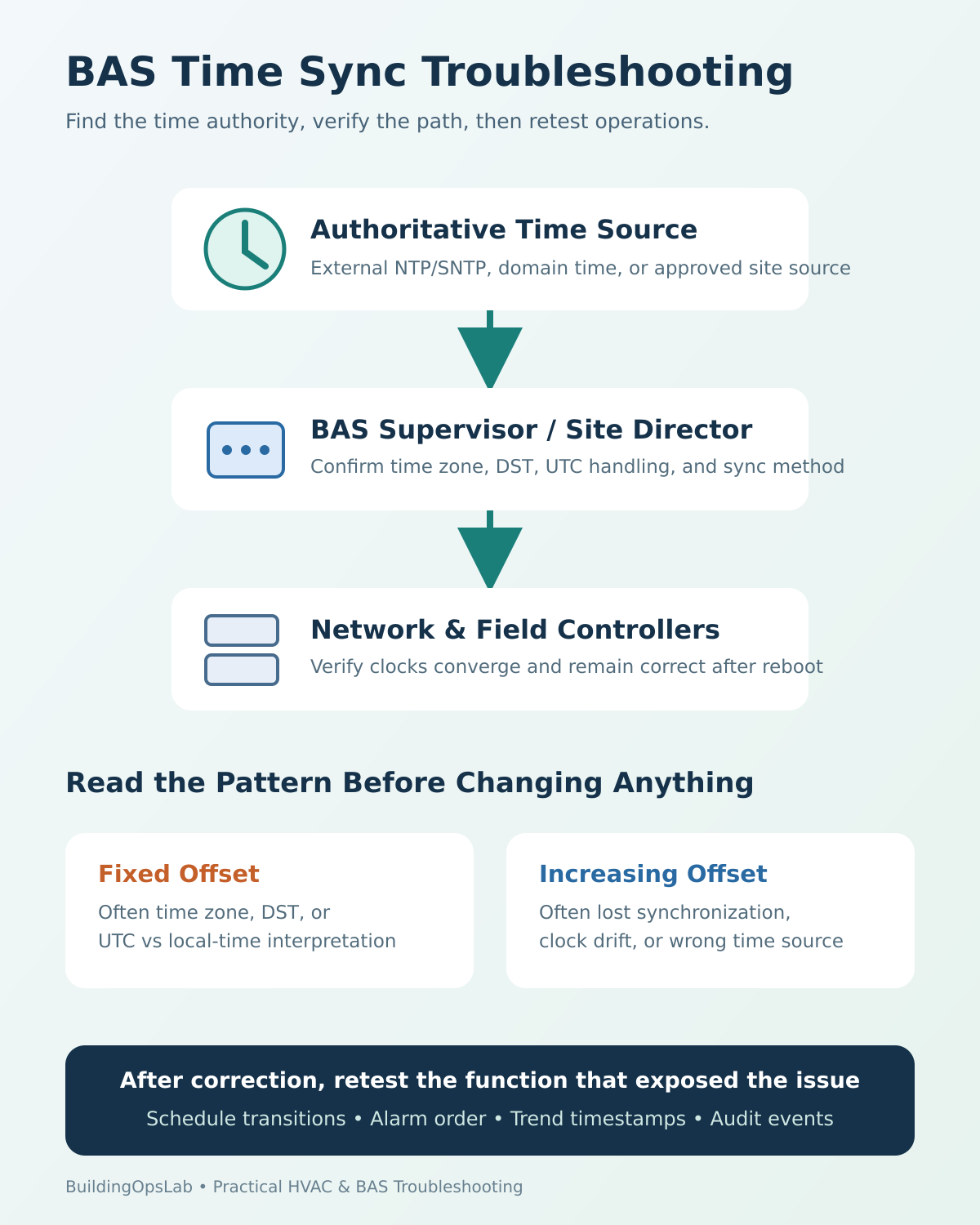
Diagnostic clue: Fixed offset = investigate time zone, DST, or UTC/local-time handling. Increasing offset = investigate lost synchronization, drift, or an incorrect time source.
Step 2 — Identify the Authoritative Time Source
Draw the hierarchy. For example: external time source → BAS server/Site Director → network engine → field controller. That is only an example; your site may use a different chain. Identify which device should request time and which devices should only receive it.
Step 3 — Verify Time Zone and Daylight-Saving Configuration
Compare the configured time zone, UTC offset, and daylight-saving status at the relevant layers. Do not assume that changing the Windows clock on a workstation changes controller time. A workstation can merely be a client viewing timestamps generated elsewhere.
Step 4 — Verify the Synchronization Method and Network Path
Determine whether the site uses NTP/SNTP, BACnet time sync, a domain/operating-system time service, or a vendor-specific mechanism. Then verify the configured server name or address and the network path to it. If BACnet time synchronization is used, confirm the intended time-master device rather than enabling time distribution on another controller simply because it is available.
Step 5 — Check Which Device Actually Time-Stamps the Data
Do not assume that the screen you are looking at created the timestamp. In Metasys, for example, current documentation identifies the Network Engine as the time source for trend data, events, and commands, while some server-side functions use server time. Other systems differ. This is why two views of the same event can sometimes be misleading if the architecture is not understood.
Step 6 — Correct the Source, Then Watch the Children
Once the correct time authority is fixed, verify that subordinate devices actually converge on the same time. Avoid setting each controller manually unless the manufacturer specifically requires it. Manual correction can hide the real synchronization failure and create the same problem again after the next reboot.
Step 7 — Re-Test the Function That Exposed the Problem
A correct clock display is not the end of commissioning. Verify the schedule transition, trend timestamps, alarm/event ordering, and audit log behavior that originally raised the concern. If the site has a scheduled reset or daily sequence, verify it at the next occurrence or use an approved functional test.
Field Notes and Evidence Limits
The service examples summarized here describe a remote time-sync correction for AHU-1 and time-sync issues observed at another multi-controller site. The published notes do not include before-and-after clock offsets, the exact configuration changes, or a defined observation period. They therefore illustrate why time synchronization should be checked; they do not establish a confirmed root cause for every schedule, alarm, or trend issue.
For your own investigation, record the reference time, device time, time zone, synchronization source, and affected function before making changes. Repeat the observations after an authorized correction and at the next relevant schedule or event. A corrected clock display alone does not establish that the original operating problem has been resolved.
Time-Synchronization Investigation Record
Use this blank record to separate the symptom from the evidence. It is a worksheet, not a completed field case. Copy it into your approved service report and keep sensitive site details in your organization’s records.
| Record | Before correction | After correction / follow-up |
|---|---|---|
| Observation date and reference time, including time zone | — | — |
| Device role and local identifier | — | — |
| Device time and difference from the reference | — | — |
| Configured time zone / daylight-saving setting | — | — |
| Configured synchronization method and source | — | — |
| Affected function: schedule, alarm, trend, or audit event | — | — |
| Timestamp-producing device, if established | — | — |
| Authorized change and backup/change record | — | — |
| Functional verification result and observation period | — | — |
| Remaining uncertainty and next check | — | — |
Record “not verified” when evidence is missing. Do not treat a fixed offset as proof of a time-zone problem, or drift as proof of a network problem; these are clues that require platform-specific verification. Set acceptance criteria using the equipment documentation and the site’s operating requirements.
What Facility Managers Can Check Safely
- Note the exact time when the complaint occurs and compare it with the BAS schedule.
- Capture screenshots showing the displayed time and the event/alarm timestamp.
- Check whether the offset is consistent, such as exactly one hour.
- Ask whether the issue began after daylight-saving time, a server migration, router change, or controller replacement.
- Avoid manually changing controller clocks unless directed by the BAS technician or manufacturer procedure.
BAS Technician Checklist
☐ Document the authoritative time source and synchronization hierarchy.
☐ Compare server/supervisor, engine, field-controller, and workstation clocks at the same moment.
☐ Verify time zone, UTC offset, and daylight-saving configuration.
☐ Confirm the intended NTP/SNTP, BACnet, or platform-specific time-sync method.
☐ Verify the time source is reachable and configured correctly.
☐ Check for unintended secondary time masters.
☐ Confirm which device time-stamps trends, alarms, and audit events.
☐ Re-test schedule transitions and timestamps after correction.
☐ Verify time remains correct after reboot or power restoration.
☐ Document the final time-sync architecture for future service.
Key Takeaways
- Time synchronization affects operations, not just display clocks.
- A fixed offset and a drifting clock point toward different root causes.
- Fix the authoritative time source instead of manually correcting every controller.
- Time zone, DST, and UTC handling must be checked separately from clock synchronization.
- Always verify the schedule, trend, or alarm function that exposed the problem after the clocks are corrected.
FAQ
Can a BAS schedule be correct but still run at the wrong time?
Yes. If the device executing the schedule has the wrong time, time zone, or daylight-saving interpretation, a correctly configured schedule can execute at an unexpected real-world time.
Should every BAS controller point directly to an internet time server?
Not necessarily. Many BAS architectures use a hierarchy in which one supervisory device obtains authoritative time and subordinate devices synchronize from it. Follow the platform design and manufacturer documentation.
Why do trend timestamps look strange after fixing the clock?
A clock correction can create an apparent jump in the historical timeline, especially if the device had been significantly offset. Preserve the pre-correction evidence and confirm which device generated each timestamp.
Is BACnet time synchronization the same as NTP?
No. BACnet defines its own time-synchronization services. A BAS can use NTP/SNTP upstream and BACnet time synchronization downstream, or another architecture entirely.
Related Articles
- BAS Schedule Not Working? Why Equipment Ignores the Schedule and What to Check First
- What BAS Points Should You Trend? A Practical HVAC Troubleshooting Trend List
- BACnet Device Instance vs MAC Address vs Network Number: What’s the Difference?
Sources & Further Reading
- Johnson Controls — SNE Commissioning Guide 16.0: Time-zone, date, and time management
- Johnson Controls — Network and IT Guidance 16.0: Time management (SNTP)
- BACnet Committee — BACnet Addenda / Time Synchronization services
- BACnet Committee — BACnet Standard access page
Disclaimer: This article provides general commercial HVAC and building-automation information. Always follow manufacturer documentation, site-specific procedures, and applicable safety requirements.