BACnet MS/TP Troubleshooting: A Complete Field Guide for BAS Networks
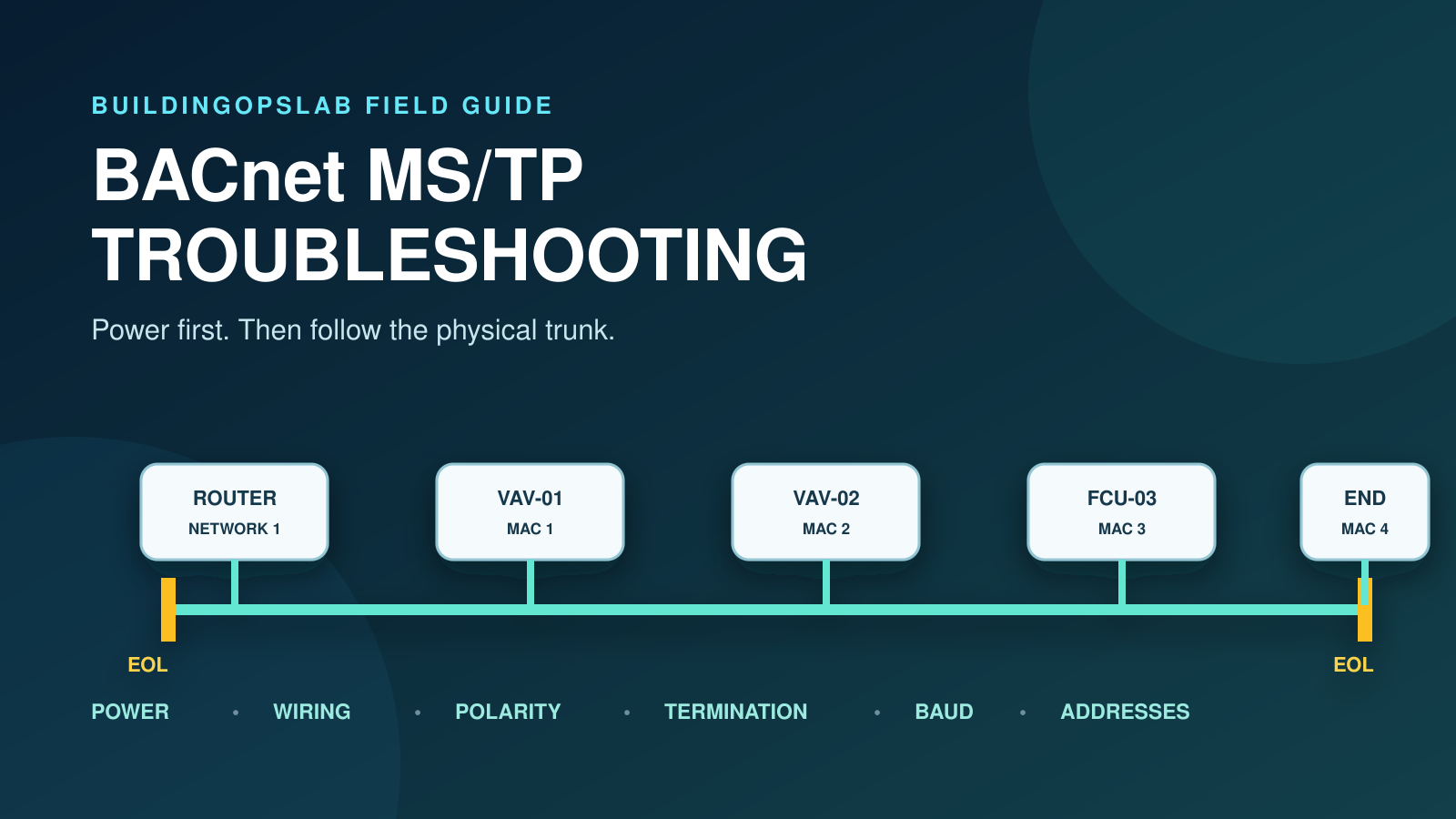
BACnet MS/TP troubleshooting becomes much easier when you diagnose the trunk as a physical network first and a software network second. One loose power connector, crossed pair, duplicate MAC address, incorrect baud rate, or misplaced end-of-line termination can make several controllers appear failed at once.
Start with controller power, follow the RS-485 cable, verify configuration, and isolate the affected section before replacing hardware.
Quick Answer: Check These Seven Items
When BACnet MS/TP controllers go offline, check these items in order:
- Controller and router power
- Trunk continuity and daisy-chain wiring
- Data-pair polarity at every device
- Shield and grounding practice required by the installed manufacturer
- End-of-line termination at the actual physical ends
- One compatible baud rate across the trunk
- Unique MAC addresses and BACnet device instances
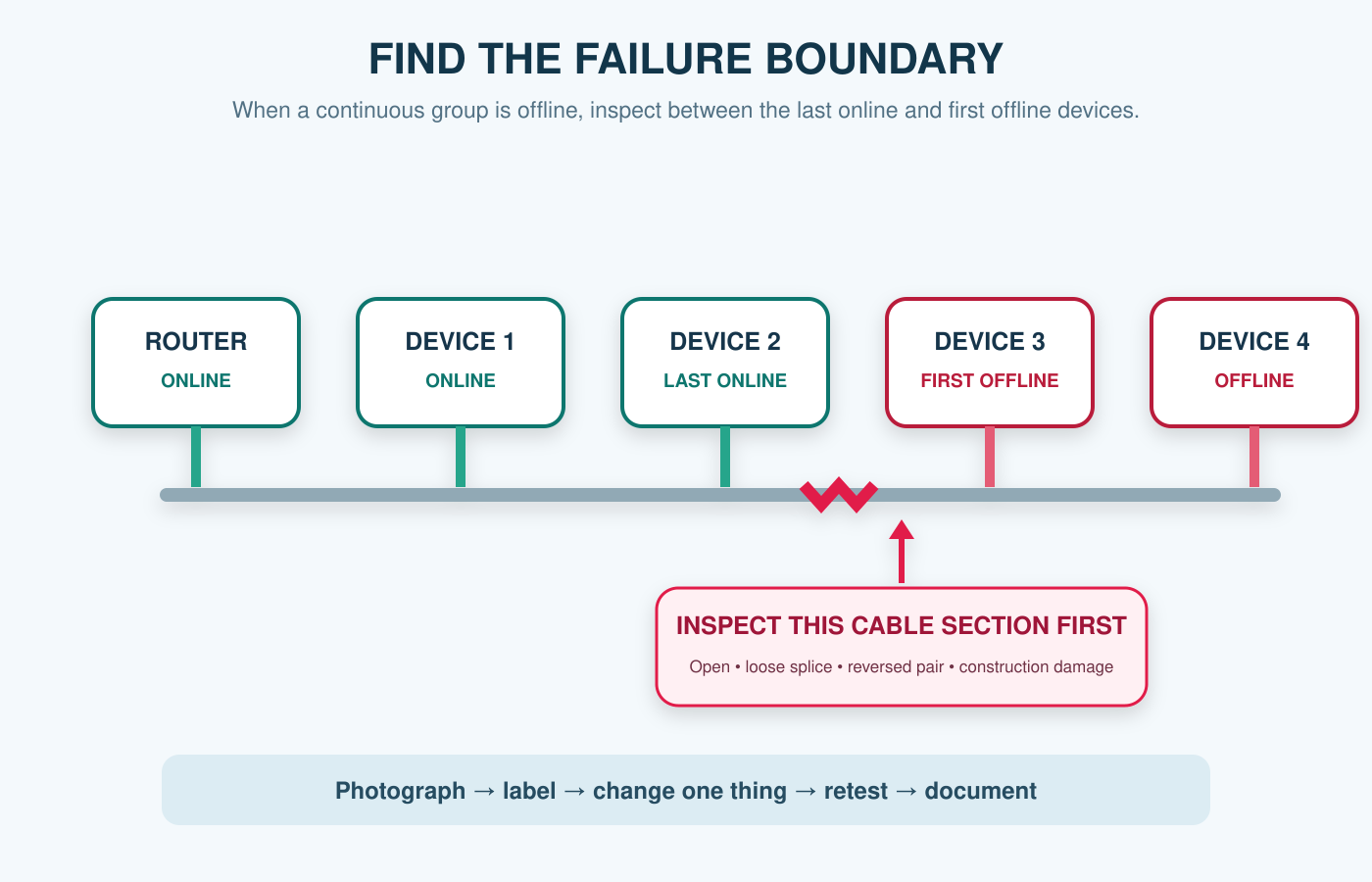
If a large group is offline, identify the last online device and the first offline device. The fault is often between them.
What BACnet MS/TP Is
BACnet MS/TP is a multidrop serial network that uses EIA-485 signaling and token passing. BACnet International’s glossary describes MS/TP as a token-passing data-link layer for a multidrop serial bus. In practical terms, multiple controllers share one communication pair and take turns transmitting.
One wiring or configuration fault can affect every device beyond it. A BAS graphic may show twenty controllers offline even when one cable is disconnected.
Current BACnet terminology uses manager instead of the older “master.” Older labels such as Max Master remain in installed software; token and address settings must still match the network design.
Read the Outage Pattern Before Touching the Trunk
The shape of the failure helps you choose where to begin.
| What you see | Start here |
|---|---|
| One controller offline | Local power, MAC address, device instance, terminal connection, and controller health |
| A continuous group offline | Cable path between the last online and first offline devices |
| Every controller on the trunk offline | Router or JACE port, shared power issue, short/open circuit, baud rate, or trunk-wide wiring problem |
| Devices repeatedly drop in and out | Termination, polarity, duplicate MAC, noise, shield/grounding, poor splice, or unstable power |
| Devices discover but values are unreliable | Duplicate identifiers, excessive traffic, router configuration, polling, or physical-layer quality |
| Outage began after construction | Cut, disconnected, extended, or rerouted communications cable |
Do not start by replacing the controller with the loudest alarm. Start with the pattern.
Step 1: Confirm Power First
An unpowered controller cannot communicate, and a group of controllers may share the same transformer, breaker, fused terminal, or local disconnect.
At affected devices, confirm the required supply voltage using the manufacturer’s procedure and a rated meter. Inspect power terminals, fuses, transformer outputs, shared commons, and loose plugs.
When several controllers fail together, check their shared power source. Whether local equipment also stopped helps separate power loss from a communications-only outage.
Step 2: Inspect the RS-485 Cable Path
Follow the trunk from the router or JACE serial port to the end device. Compare it with approved drawings while accounting for later renovations.
MS/TP is normally a daisy chain. Look for star branches, long stubs, untwisted conductors, loose terminals, damaged insulation, and hidden splices. Construction can leave communication cable cut, coiled, or separated.
If all devices after one point are offline, inspect that transition first. Photograph and label wiring, make one controlled change, then retest.
Step 3: Verify Polarity Without Trusting Letter Names
RS-485 communication requires consistent data-pair polarity through the entire trunk. However, terminal labels are not universal. One manufacturer may use + and −, another may use A and B, and different manuals may not map A/B labels the same way.
Use product documentation and the site wire-color standard. Trace the pair through routers, controllers, repeaters, and splices. Matching “A” across two manufacturers does not prove correct polarity.
Reversed polarity may take one controller offline, everything beyond a wiring change, or the entire segment depending on the hardware and topology.
Step 4: Check Shielding and Grounding
Use the cable, shield, and grounding method specified by the manufacturer. Maintain required separation from VFD output conductors, contactors, and other noise sources.
Look for unintended shield grounds, shorts to data terminals, and unshielded replacement cable. Grounding practice depends on the installed system.
Noise faults are often intermittent. If controllers drop out when a VFD or motor starter operates, correlate the outage with equipment state.
Step 5: Verify End-of-Line Termination
Termination reduces signal reflections. Terminate the two actual physical ends of the daisy chain using the manufacturer’s required hardware or switches.
The router is an end only if it is physically at one end. Do not terminate every controller. Account for built-in switches, external resistors, repeaters, and segment boundaries.
Johnson Controls’ current MS/TP bulletin documents end termination and product-specific exceptions. Apply the principle through the installed manufacturer’s details.
Step 6: Confirm a Compatible Baud Rate
Every device needs a compatible baud rate. A replacement left at a different fixed rate may stay offline or disrupt discovery. Auto-baud behavior is manufacturer-specific.
Record the rate at the router, controllers, and repeaters. Compare the suspect device with approved configuration before changing the trunk.
If the problem began after replacement or commissioning, baud mismatch should be near the top of the list.
Step 7: Check MAC Addresses and Device Instances
Each node needs a unique MAC address on its local MS/TP network. Duplicates can cause intermittent communication, slow token rotation, or complete loss. Isolate sections until the conflict returns.
The device instance is different: it identifies a device across the BACnet internetwork and must also be unique. A valid local MAC can coexist with a conflicting device instance.
Think of the difference this way:
- MAC address: local seat on one MS/TP segment
- Device instance: unique identity across the BACnet internetwork
Check both after controller replacements, factory resets, copied application downloads, or expansion work.
Step 8: Isolate the Trunk Methodically
When visual inspection does not reveal the fault, divide the network into smaller sections.
Start at the router or the boundary between online and offline devices. Preserve labels, coordinate the outage, test a known section, then add sections back one at a time.
If removing one branch restores stability, inspect it for shorts, reversed polarity, duplicate addresses, termination, failed transceivers, and unapproved topology.
An MS/TP capture can confirm missing nodes or repeated errors, but it does not replace power and wiring checks.
Device Count and Cable-Length Limits Are Not Universal
Do not apply one “maximum devices” or “maximum feet” rule to every trunk. Limits depend on transceivers, unit loads, cable, baud rate, topology, repeaters, routers, noise, and manufacturer requirements.
The traditional RS-485 reference to 32 unit loads is not a universal BACnet device limit. Modern transceivers may use fractional loads, while products may impose lower limits. Use the installed engineering documents.
The same caution applies to 38.4 kbps and other baud rates. A rate that works on one manufacturer’s designed segment should not be assumed correct for another.
Real Field Example: The Cable Was Cut During Construction
A group of basement fan-coil controllers went offline after construction work. The JACE and upstream controls remained online, so replacing the JACE would not have addressed the failure.
Following the trunk from the last online controller to the first offline controller led to two junction boxes. The communication cable had been cut, and the two ends were coiled separately. A properly routed temporary connection restored communications and confirmed the root cause before permanent repair.
In another service call, a single VAV controller that appeared to have a network problem simply had its removable power terminal unplugged. Both cases support the same rule: check power and the physical cable path before changing software.
BACnet MS/TP Troubleshooting Checklist
Frequently Asked Questions
Why did many controllers go offline at the same time?
They likely share a common point of failure: router power, serial port, transformer, cable segment, short circuit, configuration change, or trunk-wide addressing issue. Use the outage pattern to find the shared dependency.
Can one duplicate MAC address take down a trunk?
Yes. The effect can range from intermittent errors to severe communication loss. Isolate trunk sections and verify every local MAC rather than assuming the database is current.
Are MAC address and BACnet device instance the same thing?
No. The MAC address is used on the local MS/TP network. The device instance identifies the BACnet device across the wider BACnet internetwork. Both must be unique in their required scope.
Should termination be enabled on every controller?
No. Termination normally belongs at the actual ends of the RS-485 segment, following the installed manufacturer’s documentation. Excess or missing termination can degrade communications.
How many controllers can I put on one MS/TP trunk?
There is no safe universal answer. Use the controller and router documentation, cable specification, engineered topology, repeater design, and manufacturer limits for the installed system.
What if the MS/TP trunk is fine but the Supervisor still shows devices offline?
Check the BACnet router, JACE station, BACnet network configuration, Supervisor connection, point mapping, and stale-data behavior. The offline JACE troubleshooting guide explains how to separate those higher layers.
Related Articles
Sources and Further Reading
- BACnet International Glossary
- ANSI/ASHRAE Standard 135-2024 Publication Notice
- Johnson Controls MS/TP Communications Bus Technical Bulletin
- Johnson Controls: Common MS/TP Problems
- Johnson Controls: Duplicate Addresses
This article provides a general troubleshooting framework. Follow the installed equipment documentation, site safety procedures, change-control requirements, and qualified support guidance for your specific system.