AHU Supply Air Temperature Won’t Reach Setpoint? What to Check First

AHU supply air temperature problems can keep a unit running continuously while the measured value stays several degrees away from its active setpoint. The cooling valve may show 100%, the heating valve may show closed, and the BAS may still indicate that the unit is in the correct mode. That does not prove the coil is delivering the required capacity—or even that the BAS is measuring the right temperature.
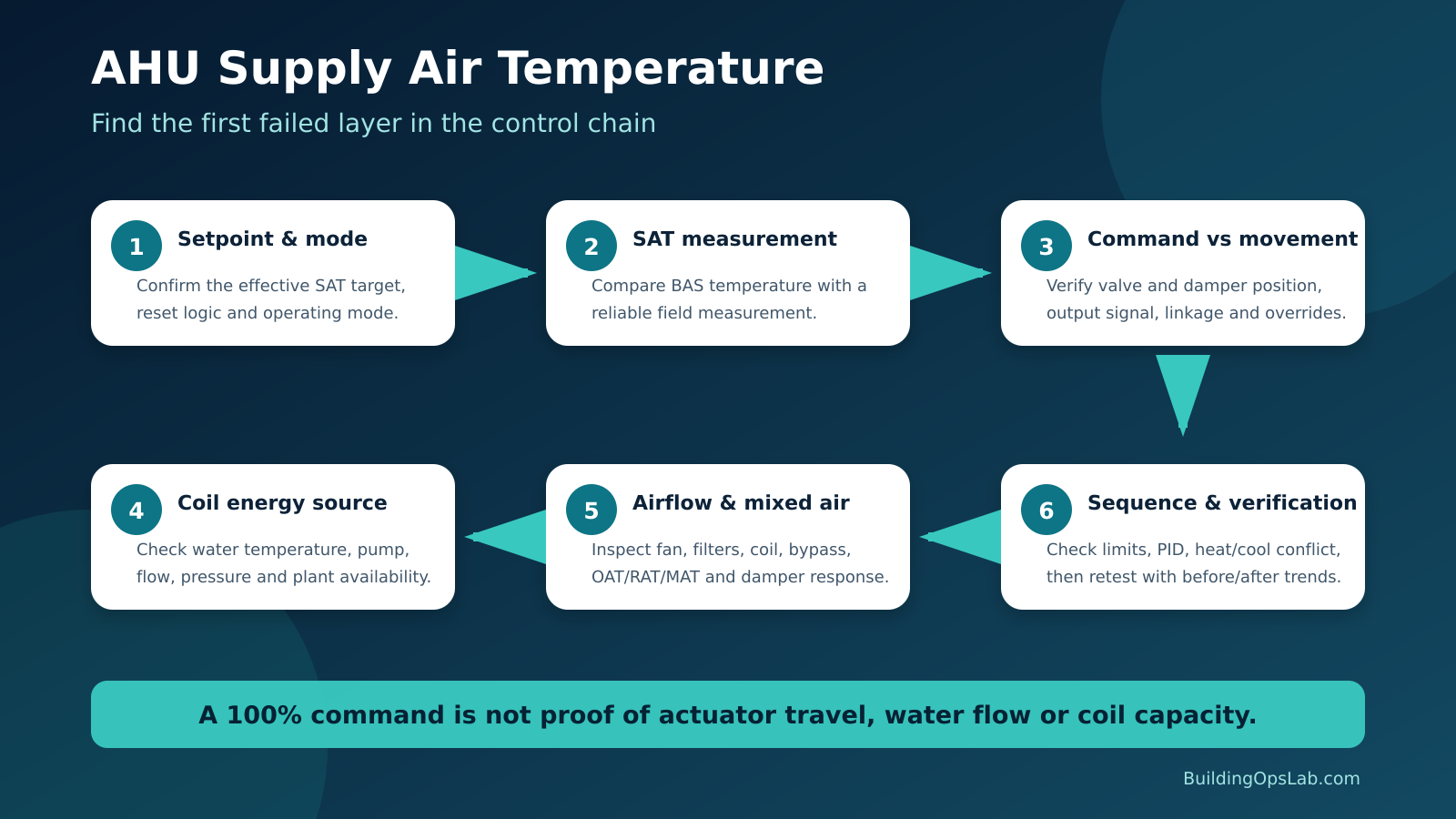
The fastest way to troubleshoot this problem is to separate the control chain into layers: effective setpoint, temperature measurement, controller output, actuator movement, heat-transfer source, airflow, mixed-air conditions, and sequence logic. Follow the chain until the first point where the expected response stops.
Quick Answer
Confirm the active operating mode and effective SAT setpoint first. Then verify the supply-air sensor against a reliable field measurement, compare BAS command with physical valve or damper movement, prove the heating or cooling source at the coil, check airflow and mixed-air conditions, and review reset logic, limits, PID behavior, safeties, and overrides. Fix the first failed layer, then retest the complete sequence.
In This Guide
- The Problem: SAT Error Can Come From Several Layers
- Why It Happens
- How to Diagnose an AHU That Cannot Reach SAT Setpoint
- How to Fix It
- Real-World Field Example
- What Facility Managers Can Check Safely
- AHU / BAS Technician Checklist
- Key Takeaways
- FAQ
- Field Evidence Worksheet
- Choose Your Next Diagnostic Step
The Problem: SAT Error Can Come From Several Layers
Supply-air temperature (SAT), also called discharge-air temperature (DAT) on some systems, is a controlled variable. The BAS compares the measured temperature with an active setpoint and then modulates cooling, heating, dampers, or packaged equipment according to the sequence.
The active setpoint is not always a fixed number. PNNL, ASHRAE, Trane, and Johnson Controls document strategies in which supply-air temperature can be reset according to outdoor conditions, zone demand, return or space conditions, or other logic. Before calling the AHU “unable to make setpoint,” verify which setpoint is actually active at that moment.
A useful diagnostic question is: Is the problem in the requested target, the measurement, the command, the physical response, or the available heating and cooling capacity?
Why It Happens
1. The effective SAT setpoint is not what the operator thinks it is
Reset logic, warm-up or cooldown, humidity control, overrides, demand limits, or a packaged controller may be using a different target than the graphic appears to show.
2. The supply-air sensor is wrong
Sensor type, input configuration, scaling, wiring, placement, calibration, or thermal contact can create a believable but false SAT. The BAS sensor troubleshooting guide explains how to trace the value from the sensor through wiring, input configuration, scaling, BACnet object, and graphic.
3. The BAS command is not producing physical valve or damper movement
A 100% graphic command does not prove actuator travel. Check output scaling, linkage, pneumatic supply, overrides, priorities, and physical position. A 0–10 V versus 2–10 V mismatch can create a believable graphic value while the actuator receives the wrong signal range.
4. The coil does not have the required heating or cooling source
A fully open valve cannot compensate for warm chilled water, low flow, an offline pump, a closed isolation valve, or an unavailable heating or cooling plant.
5. The airflow or heat-transfer condition is wrong
Dirty filters or coils, fan or VFD problems, incorrect fan speed, closed dampers, or air bypass can change the leaving-air temperature even when the valve command looks normal.
6. Mixed-air conditions are adding unexpected load
Economizer or outdoor-air damper problems, incorrect commands, or extreme outdoor conditions can move mixed-air temperature far enough to overwhelm the expected coil response.
7. Heating and cooling are fighting each other, or the control loop is limited
Preheat or reheat, leaking valves, safety limits, output clamps, PID limits, humidity logic, and supervisory overrides can all prevent the expected SAT response.
How to Diagnose an AHU That Cannot Reach SAT Setpoint
Step 1 — Confirm the operating mode and effective SAT setpoint
Record whether the AHU is in cooling, heating, warm-up, dehumidification, economizer, unoccupied, or another site-specific mode, and capture SAT and its active setpoint together.
Step 2 — Verify the SAT measurement
Compare the BAS value with a calibrated field measurement at a representative location, then check sensor type, input configuration, units, scaling, and trend stability.
Step 3 — Trend the control story on one time axis
Start with SAT, SAT setpoint, cooling and heating output, fan status, and fan speed. Add outdoor-air temperature, return-air temperature, mixed-air temperature, actuator feedback, plant temperatures, damper position, alarms, and safeties as needed. The BAS trending guide provides a practical framework for selecting related points.
Step 4 — Compare command with physical actuator movement
Verify valve or damper travel and the actual output signal or network command. For pneumatic devices, verify main air and transducer operation. Do not treat a graphic percentage as position proof unless commissioned feedback is available.
Step 5 — Verify the energy source at the coil
For hydronic coils, check plant temperature, pumps, valve position, and available differential pressure or flow. Use equivalent manufacturer-approved checks for steam, DX, or electric heat.
Step 6 — Check the air side
Inspect filters, coils, fan and VFD operation, bypass, damper position, and whether airflow is consistent with the approved sequence.
Step 7 — Check outdoor-air and mixed-air control
Compare outdoor-, return-, and mixed-air temperature with economizer and minimum-outdoor-air commands. Verify actual damper movement rather than relying on command alone.
Step 8 — Check for simultaneous heating, reset logic, limits, PID behavior, and overrides
Review the existing sequence instead of applying a generic SAT setpoint or tuning value. If a safety changes the expected sequence, confirm the physical device and the BAS interlock; the AHU freezestat interlock guide shows why cooling command, fan proof, and safety state must be checked together.
Step 9 — Correct the first failed layer and retest
Verify SAT response, actuator response, plant availability, zone demand, humidity where relevant, and alarms. Keep before-and-after trend data.
How to Fix It
The repair depends on the failed layer: correct the sensor or input, remove an unintended override, restore valve or plant operation, repair airflow or economizer problems, or correct the SAT reset and sequence.
Do not “fix” the complaint by forcing a colder or hotter SAT setpoint without understanding the design. SAT interacts with zone airflow, reheat, humidity, fan energy, and comfort. Changing the target can move the symptom downstream.
Real-World Field Example: The Temperature Signal Was Part of the Problem
At one commercial building, an AHU supply-air-temperature issue led to verification of both the sensor and controller input. The SAT sensor was replaced, and the controller input type was corrected so the BAS interpreted the sensor properly.
The lesson is simple: prove the SAT measurement before changing valve logic, PID settings, or plant setpoints. A wrong but believable value can make the rest of the sequence look defective.
What Facility Managers Can Check Safely
- Capture the actual SAT and SAT setpoint at the same time.
- Note the AHU mode: cooling, heating, economizer, warm-up, unoccupied, or other.
- Record cooling and heating valve commands and fan status from the BAS.
- Check whether the problem occurs only at certain outdoor temperatures or times of day.
- Note whether multiple zones are warm or cold, or only one zone is affected.
- Save trend screenshots before anyone changes setpoints or overrides.
- Leave energized electrical, refrigeration, steam, combustion, and safety testing to qualified personnel.
AHU / BAS Technician Checklist
☐ Confirm the effective SAT setpoint and active operating mode.
☐ Compare BAS SAT with an independent field measurement.
☐ Verify sensor type, input configuration, scaling, units, and reliability.
☐ Trend SAT, SAT setpoint, cooling/heating output, fan status, and fan speed.
☐ Add OAT, RAT, MAT, damper command/feedback, and plant temperatures where available.
☐ Verify valve and damper command versus physical actuator movement.
☐ Verify the heating or cooling source is actually available at the coil.
☐ Check filters, coil condition, airflow, fan/VFD response, and obvious bypass.
☐ Check economizer and minimum-OA dampers for correct command and movement.
☐ Check for simultaneous heating/cooling and leaking valves.
☐ Review SAT reset logic, output limits, PID behavior, safeties, and overrides.
☐ Capture before-and-after trend evidence after correction.
Key Takeaways
- “SAT not meeting setpoint” is not one fault; it is a control-chain symptom.
- Confirm the effective setpoint and operating mode before judging performance.
- Verify the SAT sensor independently before changing the control loop.
- A 100% command does not prove actuator travel, water flow, or coil capacity.
- Outdoor-air and mixed-air conditions plus simultaneous heating can make a healthy cooling coil appear weak.
- Use trends to connect setpoint, measurement, command, feedback, plant availability, and load.
- Fix the first failed layer, then recommission the sequence.
Frequently Asked Questions
What should an AHU supply-air-temperature setpoint be?
There is no universal value. The correct target depends on the AHU design, zone loads, humidity requirements, airflow, terminal equipment, and sequence. Many systems reset SAT instead of using one fixed value all year.
If the cooling valve is 100%, does that mean the coil is at full cooling capacity?
No. It only shows the command unless true position feedback is also available. The valve may not have moved, chilled-water flow may be inadequate, water temperature may be too warm, or the coil or air side may be restricted.
Can a bad SAT sensor make the AHU overcool or undercool?
Yes. The controller reacts to the measured value. A biased or incorrectly configured sensor can drive the output in the wrong direction or prevent the controller from recognizing that the setpoint has been reached.
Should I just lower the SAT setpoint if zones are warm?
Not until you know why the current target is not being met and whether the warm-zone problem is truly an AHU SAT issue. VAV airflow, static pressure, reheat, zone sensors, and local load can create warm spaces even when the AHU SAT is correct.
Choose Your Next Diagnostic Step
Choose the guide that matches the evidence you found. Each path addresses a different part of the system.
- The SAT reading disagrees with a field measurement: trace the sensor and input configuration.
- A valve or damper does not follow the command: compare signal range and physical travel.
- The SAT problem is intermittent: choose points to trend together.
- Fan, safety, and cooling states conflict: work through the freezestat verification guide.
Browse the HVAC troubleshooting hub →
Sources & Further Reading
- Pacific Northwest National Laboratory — AHU Supply-Air Temperature Control and Reset
- ASHRAE Handbook — Supervisory Control Strategies and Optimization
- Johnson Controls — Supply Air Temperature Control
- Johnson Controls — Metasys AHU FDD for ASHRAE Guideline 36
- Trane — Variable Air Volume Supply-Air-Temperature Reset Guidance
Disclaimer: This article provides general commercial HVAC and building-automation information. Always follow manufacturer documentation, site-specific procedures, applicable codes, lockout/tagout requirements, and safety procedures. Work on energized electrical equipment, combustion systems, refrigerant circuits, steam, and safety controls should be performed only by qualified and authorized personnel.