Duplicate BACnet Network Numbers: Why Devices Disappear After a BAS Integration
Duplicate BACnet network numbers can remain hidden until a new router, trunk, controller group, or building is added. Devices that were previously stable may then disappear from discovery, become reachable only from one side of the system, or appear intermittently because routed network information has become ambiguous.
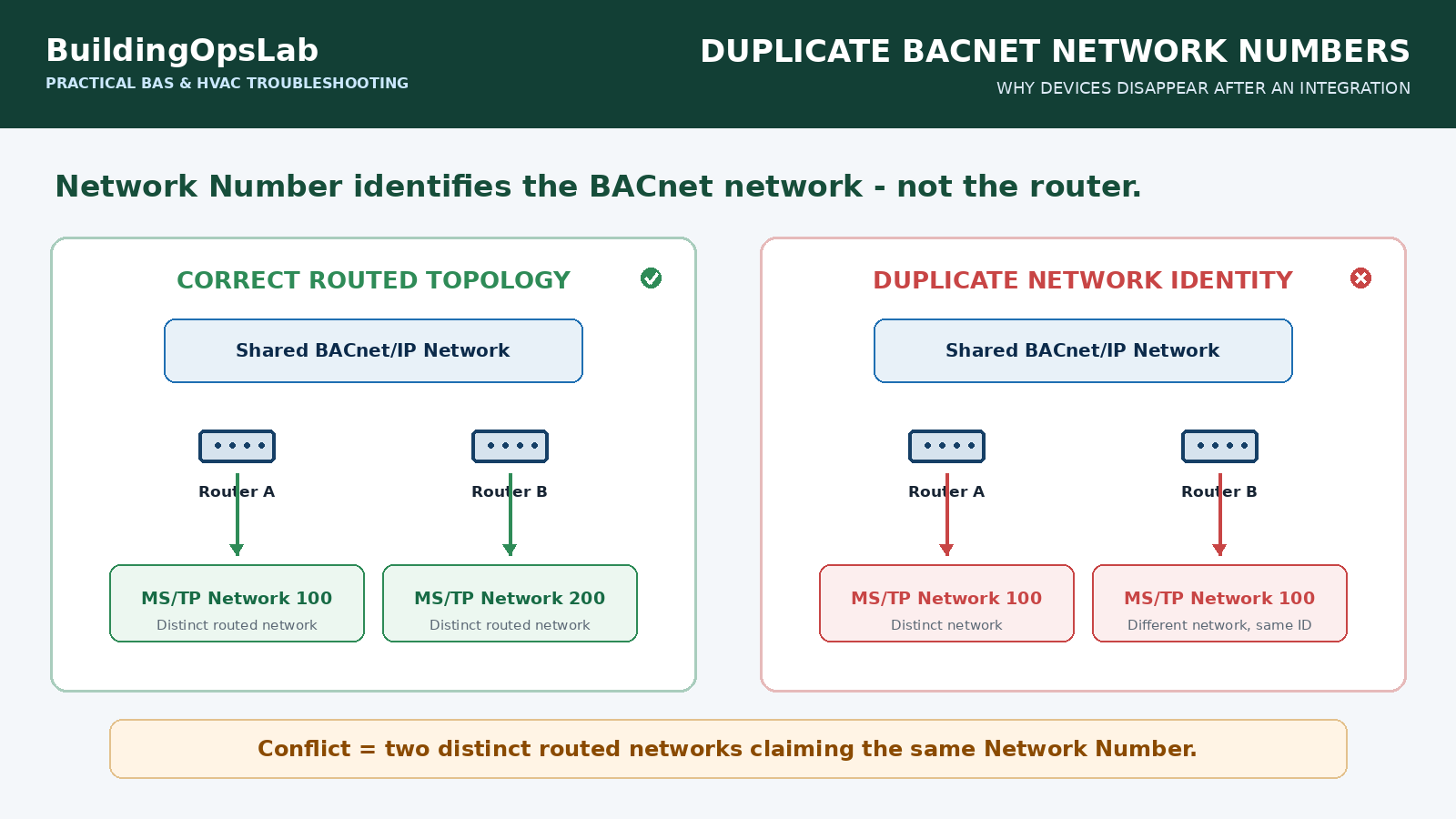
One cause that deserves early attention is a duplicate BACnet Network Number. In a routed BACnet internetwork, the Network Number identifies the BACnet network itself. If two different routed networks claim the same number, routers no longer have an unambiguous description of where that network lives.
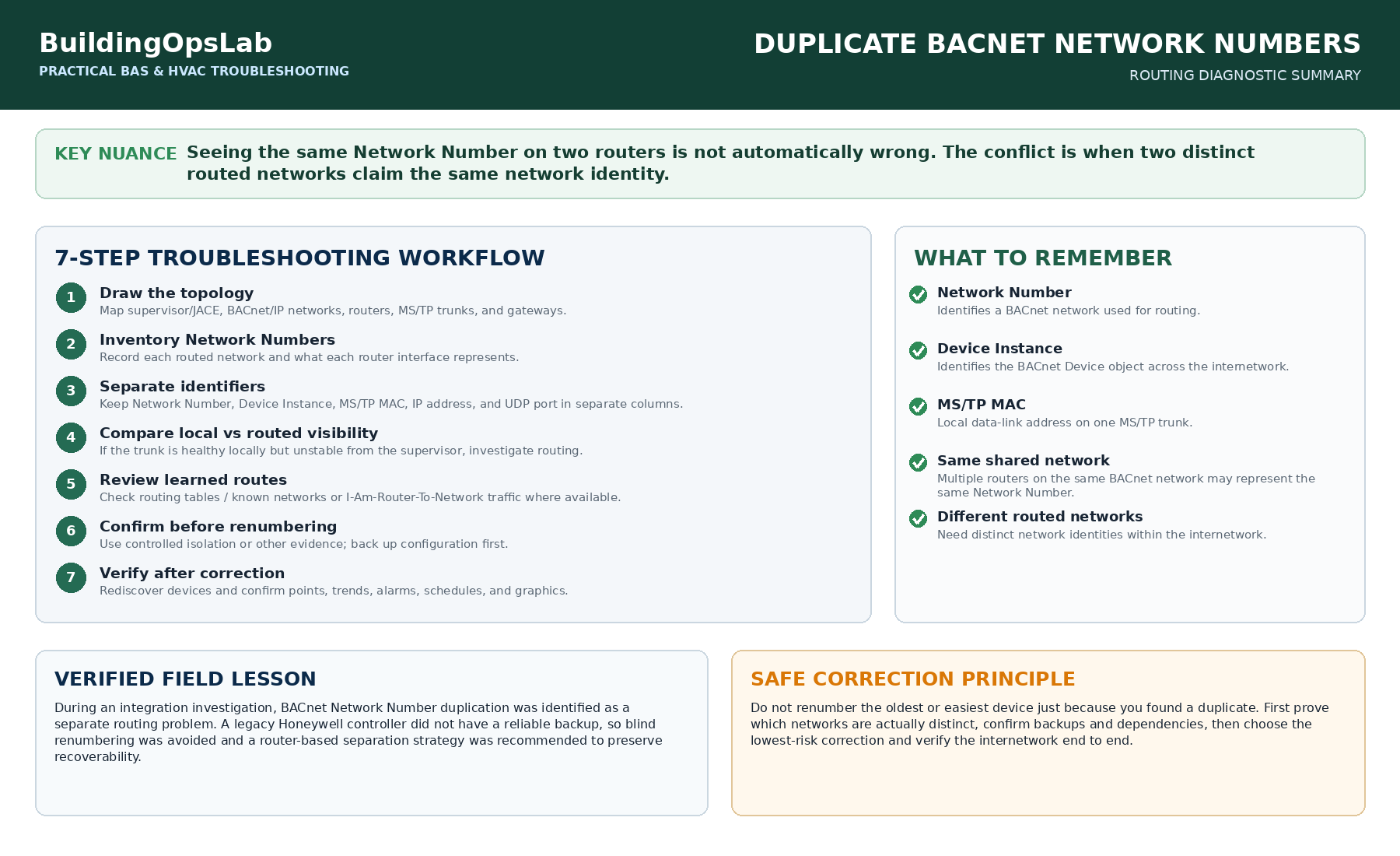
The key word is different. Multiple routers connected to the same BACnet/IP network should identify that shared BACnet network consistently. The problem is not that two routers contain the same Network Number; the problem is when two distinct networks are configured as though they are the same BACnet network.
Quick Answer
If devices disappear after a BACnet integration, map the routed topology before changing addresses. Then verify that every distinct routed BACnet network has the correct Network Number and that routers agree on the route to it.
- Identify every BACnet router and every network interface it connects.
- List the Network Number assigned to each distinct BACnet network.
- Confirm that two physically or logically different routed networks are not using the same number.
- Do not confuse Network Number with Device Instance, MS/TP MAC address, IP address, or UDP port.
- Check router learned networks or routing tables when the platform exposes them.
- Use controlled isolation or packet capture when the topology is unclear.
- Back up production controllers and router configuration before renumbering anything.
- After correction, rediscover and verify communication from both local and supervisory paths.
What a BACnet Network Number Actually Identifies
BACnet uses Network Numbers to identify networks across an internetwork. The BACnet Committee’s technical material describes the combination of network number and MAC address as the information that makes a device address meaningful beyond a single local network. Routers use Network Numbers to determine where routed traffic should go.
This is different from a Device Instance, which identifies a BACnet Device object across the internetwork, and different from an MS/TP MAC address, which is a local data-link address on one MS/TP trunk. Mixing up these identifiers is a common source of commissioning errors.
The Most Important Nuance: Network Numbers Belong to Networks, Not Routers
A common overcorrection is to assume every BACnet router must have a completely unique Network Number on every side. That is not the right model. Network Numbers describe BACnet networks. If several routers are attached to the same BACnet/IP network, they are attached to the same BACnet network and should represent that network consistently.
Uniqueness becomes critical when the networks are actually different. Two separate MS/TP trunks routed into the same internetwork should not both be presented as the same routed BACnet network. Likewise, two separate BACnet/IP networks created for routing purposes need distinct network identities.
1. Draw the Topology Before Touching Configuration
Do not begin by changing the first duplicate number you find. First draw the system as it actually exists: supervisory engine or JACE, BACnet/IP networks, IP subnets, routers, MS/TP trunks, gateways, and the major controller groups behind each route.
Mark which interfaces are on the same BACnet network and which interfaces lead to different routed networks. This prevents a common mistake: renumbering a shared BACnet/IP network simply because two routers show the same IP-side Network Number.
2. Build a Network-Number Inventory
For each router interface or routed field bus, record the configured Network Number and what physical or logical network it represents. Johnson Controls documentation for Remote Field Bus integrations explicitly requires the configured network address to match the router’s MS/TP-side network number and to be unique at the site for that routed field bus.
Also record Device Instance, MS/TP MAC address, IP address, UDP port, and router name in separate columns. Keeping these identifiers separate is one of the simplest ways to prevent a network-number problem from being misdiagnosed as a MAC or Device Instance problem.
3. Look for Symptoms That Point to Routing, Not the MS/TP Wire
Duplicate Network Numbers can show up as an internetwork problem rather than a simple local trunk fault. A controller may communicate perfectly when viewed from the router’s local side but fail from the supervisor. Devices behind one router may be visible while devices behind another route with the same network identity are missing or unstable.
Before blaming termination or baud rate, compare local and routed visibility. If every controller on an MS/TP trunk is healthy locally but the supervisor cannot consistently reach the trunk, the routing layer deserves attention.
4. Check Learned Routes and Router Advertisements
BACnet routers exchange network-layer information so devices can learn how to reach remote networks. Where the router or supervisory platform exposes a routing table, known-network list, or learned-network diagnostic, review it for duplicate or unexpected routes.
Packet analysis can also help. The BACnet Committee lists Wireshark as a developer and troubleshooting aid, and BACnet network-layer messages such as I-Am-Router-To-Network can show which router is advertising reachability to a given Network Number. Capture traffic only when permitted by the site’s network and cybersecurity procedures.
5. Isolate the Conflict Before Renumbering
If two different routed networks appear to advertise the same Network Number, temporarily isolating one route can confirm whether the ambiguity disappears. The exact isolation method depends on the site and must not interrupt critical equipment without authorization.
This test is especially valuable when the symptom is intermittent. If communication becomes stable whenever one of the duplicate routes is removed, the evidence is much stronger than simply seeing two identical numbers in configuration screens.
6. Renumber the Correct Network, Not the Most Convenient Device
Once the conflict is confirmed, choose a new Network Number according to the site’s numbering plan and the capabilities of the equipment. Do not renumber a production controller or legacy gateway solely because it is easiest to click on.
Before making a change, confirm backups, database dependencies, mapped points, graphics, trends, alarms, and any external systems that reference the routed network. Some platforms learn routes dynamically, while others may require a restart, rediscovery, or database update after the change. Follow the router and supervisory-platform documentation rather than using a universal reset sequence.
7. Verify the Internetwork After the Change
A successful correction is more than seeing green communication icons. Verify the path end to end:
Discover devices from the supervisory system and from an appropriate local tool.
Confirm devices behind both routers are reachable at the same time.
Check that mapped points update without intermittent failures.
Review router diagnostics for the expected network list.
Verify trends, alarms, schedules, and graphics that depend on those devices.
Document the final Network Number assignment so the conflict is not recreated during the next integration.
Real-World Field Case: Integration Exposed a Network-Number Conflict
During a BAS investigation at a commercial site, the work began with zone-control concerns, incorrectly mapped points, and incomplete graphics. As the network architecture was reviewed, BACnet Network Number duplication was identified as a separate integration problem that required a routing/separation strategy.
A legacy Honeywell controller was part of the existing system, and a reliable backup was not available. Rather than blindly changing a production network setting when recovery would have been uncertain, the corrective plan treated the routing architecture as the problem to solve. A BACnet-router-based separation was recommended so the duplicated network identity could be resolved without gambling on an unprotected legacy configuration.
The field lesson is important: finding a duplicate number does not mean the oldest controller should be renumbered immediately. First identify which networks are actually distinct, then choose the lowest-risk correction that preserves recoverability.
Case status and limits: this is an investigation and proposed correction, not a documented completed router installation. The published record does not include a final network-number schedule, packet capture, or post-installation trend history. A router alone does not remove a duplicate identity: the implemented design must give each distinct routed network the correct identity and pass end-to-end communication checks before the work can be called resolved.
Practical Troubleshooting Checklist
- Sketch every BACnet network and router interface.
- Separate Network Number, Device Instance, MS/TP MAC, IP address, and UDP port in your notes.
- Confirm which routers share the same BACnet/IP network and which lead to different networks.
- Inventory the Network Number on each routed network.
- Compare local device health with routed visibility from the supervisor.
- Review known-network or routing-table diagnostics where available.
- Use controlled isolation or packet capture if the conflict is not obvious.
- Back up configuration before renumbering.
- Verify graphics, trends, alarms, and discovery after the correction.
- Update site network documentation.
Key Takeaways
- A BACnet Network Number identifies a network, not a router.
- Different routed BACnet networks need distinct network identities within the internetwork.
- Multiple routers on the same BACnet network may correctly show the same Network Number for that shared network.
- Duplicate routed network identities can create ambiguous or unstable communication even when local devices and wiring are healthy.
- Map the topology before renumbering anything.
- A safe correction includes backups, verification, and updated network documentation.
FAQ
Is a BACnet Network Number the same as a Device Instance?
No. The Device Instance identifies a BACnet Device object across the internetwork. The Network Number identifies the BACnet network used for routing.
Can the same MS/TP MAC address exist on two different trunks?
Yes, because the MAC address is local to its MS/TP network. The routed address is differentiated by the Network Number. The same MAC address cannot be duplicated on the same local MS/TP trunk.
Do all BACnet routers need different IP-side Network Numbers?
Not if they are connected to the same BACnet/IP network. Network Numbers identify networks, not individual routers. Distinct routed BACnet networks need distinct network identities.
Can duplicate Network Numbers cause only some devices to disappear?
Yes. Symptoms depend on topology, learned routes, and where the client is located. Local communication can remain healthy while routed communication is ambiguous or unstable.
Should I reboot routers after changing a Network Number?
Only if the manufacturer or platform procedure requires it. Some systems relearn routes dynamically; others may require a restart, rediscovery, or database update. Follow the product documentation and verify the whole route afterward.
Related Articles
- BACnet Device Instance vs MAC Address vs Network Number: What’s the Difference?
- BACnet Router Problems: Why Devices Disappear and What to Check First
- BACnet MS/TP Troubleshooting: A Complete Field Guide for BAS Networks
Sources & Further Reading
- Bill Swan, hosted by the BACnet Committee — Internetworking with BACnet — BACnet routing, learning routers, and systematic network-number assignment.
- BACnet Committee — BACnet/IP Routing — Design considerations for multiple BACnet/IP networks and routed topology.
- Johnson Controls — MS/TP Communications Bus Technical Bulletin — Remote Field Bus network address must match the router MS/TP-side network number and be unique at the site.
- BACnet Committee — Developer Aids / Wireshark — Protocol-analysis resources for BACnet troubleshooting.
Safety Disclaimer
This article provides general commercial HVAC and building-automation information. Always follow manufacturer documentation, site-specific procedures, network-change procedures, cybersecurity requirements, and applicable safety requirements.