AHU Static Pressure Alarm Keeps Coming Back? What to Check First
An AHU static pressure alarm can disappear after a reset and then return hours or days later. That makes the sensor or VFD an easy target.
Either component could be at fault, but recurring duct-static alarms can also come from changing VAV demand, incorrect setpoints, sensor location, air-path restrictions, BAS overrides, or a real high- or low-pressure condition.
The first step is to determine whether the alarm represents a real pressure problem or a measurement/control problem.
Quick Answer
Check these areas first:
- Alarm type and source
- Static-pressure sensor and field measurement
- Static-pressure setpoint
- Supply fan operation
- VFD command and feedback
- VAV damper positions and airflow demand
- BAS trends and overrides
- Mechanical air-path restrictions
What to Check First
- ✓ Is the alarm high static, low static, or a separate protective safety?
- ✓ What was the duct pressure when the alarm occurred?
- ✓ What was the active static-pressure setpoint?
- ✓ What was the supply-fan/VFD speed?
- ✓ Were VAV dampers mostly open or mostly closed?
- ✓ Does the field pressure measurement agree with the BAS?
- ✓ Are any fan or setpoint overrides active?
1. Identify the Alarm Source
A BAS software alarm is not necessarily the same thing as a high-static protective limit. Determine which device generated the alarm, whether it resets automatically or manually, and whether a safety circuit is involved.
Do not bypass a protective high-static limit to keep the AHU running. Repeated safety trips require investigation.
2. Verify the Static-Pressure Sensor
The fan-control loop depends on a believable pressure signal. Check the sensor range, wiring, pressure tubing and pickup where applicable, BAS scaling, and sensing location.
Before replacing the sensor or changing the fan loop, compare the BAS value with an independent pressure measurement. If the field reading and BAS reading differ materially, continue through the sensing chain.
3. Compare Pressure With Fan Speed
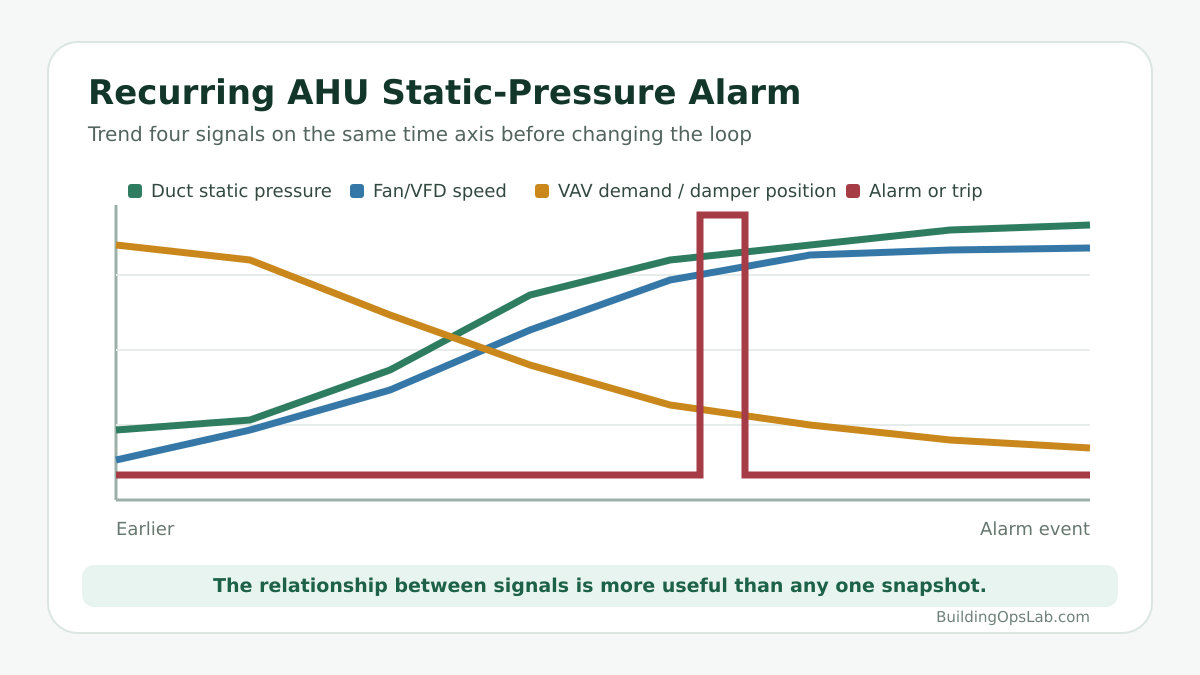
Trend static pressure, static-pressure setpoint, fan-speed command, and VFD feedback together.
If pressure falls and fan speed rises, the controller may be responding normally to increased demand. If pressure stays low while the fan reaches its upper limit, investigate airflow demand, fan capability, restrictions, or the sensor. If pressure rises while fan speed stays high, look for overrides, setpoint problems, or control-loop behavior.
A single snapshot is rarely enough. Look at what changed first.
4. Check the VAV Boxes
In a VAV system, the terminal boxes and AHU influence each other. As zone dampers open and close, the system pressure changes and the supply fan responds.
Review VAV airflow setpoints, actual airflow, damper positions, zone demand, offline controllers, and overrides. A downstream VAV problem can show up as an AHU pressure problem.
Modern sequences such as ASHRAE Guideline 36 use demand-based static-pressure reset so the system can reduce pressure when zones do not need it and increase pressure when terminal requests justify it.
5. Verify the Static-Pressure Setpoint
There is no universal duct-static setpoint that is correct for every AHU. The appropriate value depends on duct design, fan selection, terminal requirements, sensor location, and the control strategy.
Before changing the setpoint, review the sequence of operation, TAB/commissioning information, and the BAS logic. If the site uses trim-and-respond or another reset strategy, verify that the reset requests themselves are valid.
6. Check the Fan and VFD
If the pressure signal appears accurate, compare the fan command with the actual response. Check VFD mode, speed reference, actual output, alarms, limits, and fan proof.
A changing VFD speed does not automatically mean the drive is failing. If the BAS command moves and the drive follows it correctly, the investigation may belong upstream in the control sequence.
7. Look for Mechanical Air-Path Problems
Controls cannot correct a physical restriction or distribution problem. Depending on the AHU and sensor location, dirty filters, restricted coils, closed dampers, fire/smoke damper position, duct changes, or other mechanical conditions can affect pressure and airflow.
Avoid rules such as “a dirty filter always causes low duct static.” The effect depends on where the restriction is and how the fan loop responds.
8. Use Trends Around the Alarm
Useful trends include:
- Static pressure and setpoint
- Fan-speed command and feedback
- Supply-fan status
- High/low pressure alarm
- Representative VAV damper positions or pressure requests
- Operating mode and overrides
If the alarm occurred at 3:12 p.m., review the period before 3:12. Did VAV dampers close first? Did a fan override appear? Did the setpoint change? Did the sensor jump without a corresponding fan change?
Verify the BAS Reading Before Replacing the Sensor
A BAS graphic can display a reasonable-looking static pressure even when the sensor, scaling, tubing, mapped point, or network value is wrong.
Use this order when a critical reading is in doubt: field condition → sensor → controller input → network point → graphic. That prevents a display problem from turning into unnecessary hardware replacement.
What Facility Managers Can Check Safely
- Record the exact alarm and time
- Review AHU operating status
- Review static-pressure and fan-speed trends
- Check for obvious BAS overrides
- Review VAV alarms and whether many zones are affected
- Note whether the alarm occurs during startup, shutdown, or normal operation
Field Case: A Drive Trip Was Part of the Air-System Problem
At one commercial air system, the return-fan VFD was tripping. The investigation did not treat the duct static-pressure sensor as the automatic cause. The corrective work included adjusting the drive current-limit setting, capping the return fan maximum speed at 90%, and maintaining the return-fan command approximately 10% below the supply-fan command.
Those values were specific to that installed system and are not universal settings for other buildings. The case demonstrates why a recurring pressure or airflow alarm must be reviewed with the supply fan, return fan, VFD protection, VAV demand, and the approved building-pressure sequence. A sensor replacement would not have addressed the drive trip or the fan-balance relationship.
When Controls Are Not the Answer
Mechanical or TAB investigation may be needed when required airflow cannot be achieved, ductwork has changed, many terminal units cannot reach setpoint, fan capacity is questionable, or the system has never operated correctly since construction or renovation.
Key Takeaways
- A recurring static-pressure alarm does not automatically mean the sensor or VFD has failed.
- Separate a BAS alarm from a true protective safety trip.
- Verify the pressure reading before changing the control loop.
- Review VAV demand, fan speed, and pressure together.
- Do not copy a static-pressure setpoint from another building.
- Use trends to identify the event that occurred before the alarm.
FAQ
Why does my AHU keep getting a high static pressure alarm?
Possible causes include real excessive pressure, fan-control problems, incorrect setpoints, changing damper conditions, sensor problems, overrides, or mechanical air-path conditions.
Does a high static alarm mean the VFD is bad?
No. The VFD may be following a command that is inappropriate for the current system condition. Compare the command with the drive response.
What should my AHU static-pressure setpoint be?
There is no universal value. Use the design, TAB/commissioning information, approved sequence, and terminal requirements for that system.
Should I replace the static-pressure sensor if the alarm keeps returning?
Not before verifying it. Compare the BAS reading with an independent pressure measurement and check the full sensing path.
Related Articles
Sources & Further Reading
- ASHRAE — Guideline 36-2024 Purpose and Scope
- Johnson Controls Metasys — DSP Trim & Respond Static Pressure Reset for G36
- Johnson Controls — AHU Reset Application Note
Disclaimer: This article provides general commercial HVAC and building-automation information. Always follow manufacturer documentation, site-specific procedures, and applicable safety requirements.