VFD Running but BAS Says Off? How to Find Who Actually Owns the Drive Command

A VFD can be online, communicating normally, and still ignore the start/stop command you expect from the BAS. That is because communication status and control authority are two different things.
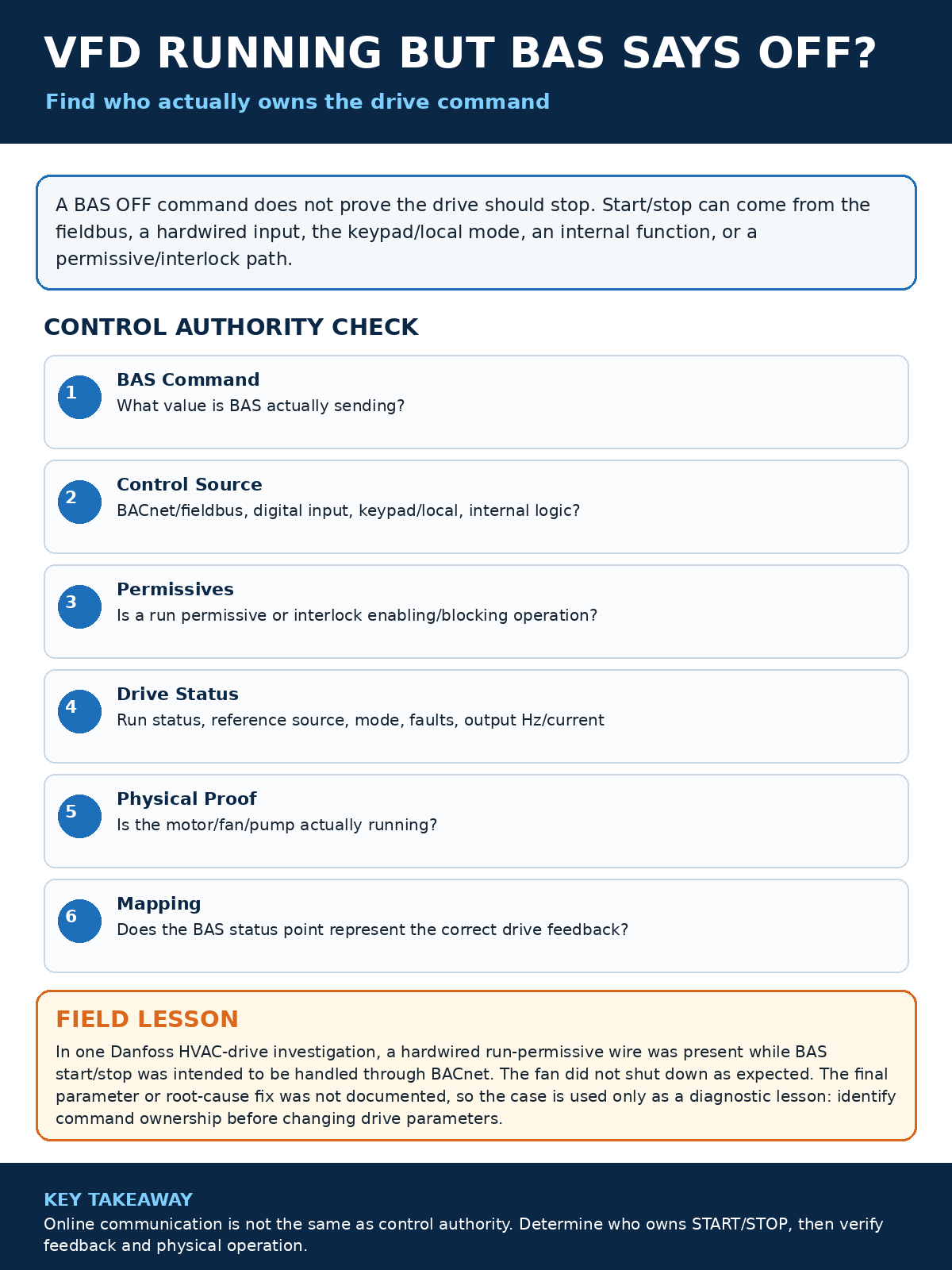
When the BAS graphic says OFF but a fan, pump, or other motor continues to run, the first question is not “What parameter is wrong?” The better question is: “Which source currently owns the drive command?”
Modern HVAC drives can accept commands from several places: a local keypad, hardwired digital inputs, BACnet or another fieldbus, an internal PID function, a packaged-equipment controller, or a combination of these sources. Some drives also allow logical AND/OR relationships between fieldbus commands and digital inputs. Danfoss and Trane documentation, for example, show that fieldbus control can be combined with terminal inputs, while ABB HVAC drives expose separate start/stop, run-permissive, start-interlock, and control-override functions.
In This Guide
- Quick Answer
- 1. Separate Communication from Control Authority
- 2. Verify the BAS Command Point
- 3. Identify the Drive Start/Stop Source
- 4. Understand Run Permissives and Start Interlocks
- 5. Check Local / Hand Operation
- 6. Compare Command, Drive Status, and Physical Proof
- 7. Review Communication-Loss Behavior
- Real-World Field Lesson: BACnet Start/Stop and a Hardwired Run Permissive
- Practical Troubleshooting Checklist
- FAQ
- Key Takeaways
- Sources & Further Reading
Quick Answer
If a VFD is running while the BAS says OFF, verify command ownership from the drive outward:
- Confirm the BAS command point and its effective value.
- Identify the drive control source for start/stop.
- Check Hand/Auto/Off or local/remote mode.
- Check hardwired start, run-permissive, safety, and interlock inputs.
- Compare drive run status and output frequency with the BAS command.
- Verify the BAS status point is mapped to the correct feedback object or physical proof.
- Review communication-loss behavior and command priority before changing parameters.
Do not assume that a BACnet write should stop the drive just because BACnet communication is healthy.
1. Separate Communication from Control Authority
Seeing live values from a VFD proves that the BAS can exchange data with the drive. It does not prove that the BAS owns start/stop. A drive can report frequency, current, alarms, and status over BACnet while its start command still comes from a digital input or local control location.
This distinction is documented across major HVAC drive platforms. ABB manuals explicitly separate fieldbus command sources from digital-input command sources. Danfoss documents a configurable control-word source and fieldbus/terminal logic. Trane TR200 BACnet documentation also notes that terminal inputs can be programmed to act independently of, or logically with, the serial communication control word.
2. Verify the BAS Command Point
Start at the BAS, but do not stop there. Confirm the point you are looking at is the actual command point, not a schedule, enable request, occupancy request, graphic-only calculation, or mirrored status value.
- Is the command object writable?
- What is its present value right now?
- Is there a higher-priority override?
- Is the object bound to the correct drive?
- Does the point represent Run/Stop, Enable, or only a permissive?
If the BAS command changes from ON to OFF, trend it together with VFD run status and output frequency. That immediately shows whether the drive follows the command.
3. Identify the Drive Start/Stop Source
At the drive, determine which control location and command source are active. The terminology varies by manufacturer, but the concepts are consistent: local versus remote, external control location, fieldbus control, digital-input control, and internal application functions.
On some drives, start/stop and speed reference can come from different sources. For example, BACnet may own start/stop while an analog input provides the speed reference, or a hardwired enable may be required before a bus start can become effective.
This is why copying a parameter number from another model is risky. Verify the exact drive model and manufacturer documentation before changing the control source.
4. Understand Run Permissives and Start Interlocks
A run permissive is not automatically the same thing as a start command. A permissive may simply allow the drive to run when another command requests operation. A start interlock may block operation until a safety condition is satisfied.
ABB HVAC documentation, for example, provides separate run-permissive and start-interlock functions. Other drives may implement equivalent logic through digital inputs or control-word bits. The practical troubleshooting step is to identify what each input actually means in that drive configuration.
- Check the live digital-input status at the VFD.
- Compare each active input with the wiring diagram.
- Verify whether the input is Start, Run Enable, Coast, External Interlock, or another function.
- Check whether the bus command is ANDed or ORed with the input.
5. Check Local / Hand Operation
A local or Hand command can make a perfectly good BAS stop command appear ineffective. Danfoss documentation shows that Hand On enables local control from the drive keypad, and ABB documentation notes that panel Hand mode can have priority over a BACnet control override on some HVAC drives.
Never force a mode change without understanding the operating risk. First record the existing mode and confirm whether the equipment is intentionally being run locally for service or emergency operation.
6. Compare Command, Drive Status, and Physical Proof
Use three layers of evidence:
- Command: what the BAS is asking for.
- Drive status: what the VFD says it is doing.
- Physical proof: whether the motor, fan, or pump is actually operating.
If BAS command is OFF, VFD status is RUNNING, and output frequency is above zero, investigate the drive control source. If the VFD says STOPPED but the BAS graphic says RUNNING, investigate mapping or feedback. If the VFD says RUNNING but the motor is not moving, the problem has shifted to the drive output, motor circuit, mechanical load, or proof method.
7. Review Communication-Loss Behavior
Fieldbus timeout behavior can create confusing symptoms. Danfoss documents configurable actions after control-word communication loss, including holding an output, stopping, or other responses. The correct choice is application-specific and must be commissioned intentionally.
Do not change timeout behavior simply to make the BAS graphic look right. Confirm the design intent for life-safety, freeze protection, process continuity, and equipment protection first.
Real-World Field Lesson: BACnet Start/Stop and a Hardwired Run Permissive
During one HVAC drive investigation, a Danfoss drive had a hardwired run-permissive wire while the BAS was intended to start and stop the fan through BACnet. The fan did not shut down as expected when the BAS command changed.
The presence of the hardwired permissive made command ownership part of the investigation. The control path had to be separated into BACnet command, terminal-input state, and drive operating mode before deciding whether the BAS or the VFD configuration was responsible.
The final parameter change or confirmed root-cause fix from that field visit is not documented, so this case should not be read as a recipe for changing a specific Danfoss parameter. The reliable lesson is to identify who owns start/stop before changing the drive.
Practical Troubleshooting Checklist
- Record the VFD model, control mode, current status, and output frequency.
- Verify the BAS command point and effective value.
- Check BACnet/fieldbus communication, but do not equate online status with control ownership.
- Identify start/stop source and speed-reference source.
- Check Hand/Auto/Off or local/remote mode.
- Review hardwired inputs and their configured functions.
- Verify permissives and interlocks.
- Compare drive status with independent physical proof.
- Review timeout/fallback behavior.
- Remove temporary overrides and retest the complete sequence.
FAQ
Can a VFD be online in BACnet but still ignore BACnet start/stop?
Yes. BACnet communication can be healthy while start/stop is sourced from a digital input, local keypad, another controller, or a drive function. Verify the configured command source.
Is a run permissive the same as a run command?
Not necessarily. A permissive often enables operation but does not itself request the motor to start. The exact behavior depends on the drive configuration.
Why does the BAS say OFF when the motor is physically running?
Possible causes include the wrong command or status point, local/Hand operation, hardwired control, a higher-priority command, drive internal logic, or incorrect feedback mapping.
Should I change VFD parameters until the BAS can stop it?
No. First document the current configuration and identify the command source. Parameter changes without an exact model-specific understanding can create unsafe or unreliable operation.
Key Takeaways
- Communication and control authority are different.
- Start/stop and speed reference can come from different sources.
- A run permissive is not automatically a start command.
- Local/Hand mode can override expected remote behavior.
- Use command, VFD status, and physical proof together.
- Do not publish or copy a “magic parameter” when the exact drive configuration is not verified.
Related BuildingOpsLab Guides
- VFD BACnet Integration: Why Start/Stop Commands Don’t Work
- BAS Graphic Says ON but the Equipment Is OFF
- HVAC Pump Hunting: Why a VFD Pump Speeds Up and Slows Down
Sources & Further Reading
- Danfoss – VLT HVAC Drive FC 102 Programming Guide
- Trane – TR200 BACnet Option Module Instruction Manual
- ABB – ACH580 HVAC Control Program Firmware Manual
Safety Disclaimer
This article provides general commercial HVAC and building-automation information. Always follow manufacturer documentation, site-specific procedures, and applicable safety requirements.